In spite of this, Video Data Bank staff and future laid off workers gathered to present an exciting display from their collection. We had a voting "chose your own adventure" screening and I got to see the following work:
MARMIA or the Mid-Atlantic Regional Moving Image Archive presented on a project to catalog on
George Udel's VHS collection, donated by Udel's friend George Figgs. Udel was the founder of the Charles Theater in Baltimore and central to the Baltimore film scene, known as a "cinemaniac" but also an avid recorder of television materials onto VHS. The presentation covered the item-level inventory of 2140 tapes with the effort to identify and categorize the content for preservation prioritization. The categories were as follows: commercial movie tapes, screeners, taped off TV existing audio visual works, taped off TV original audiovisual works, with the goal of identifying unique material.
Using Airtable, the archivists at MARMIA transcribed the spine descriptions of all tapes, then used open refine to sort the multiple titles on each tape into different cells, linked back to the same tape. Each item on the tapes with multiple parts was described as an "instance" which was linked to preexisting Wikidata. A movie like Fear and Loathing in Las Vegas could be linked to the existing Wikidata entry, with the metadata about year, director, etc. imported into the spreadsheet. For each unique instance, archivists created a Wikidata article and prioritized those items for digitization. Although MARMIA doesn't need to preserve (nor can they) commercial films, they do paint a portrait of the "intellectual soup" of George Udel, and the catalog serves as a record of this collection.
This project was a useful model to think about TAPE's own collections. We have donated tapes that are compilations of many works, and open refine is going to be a great way to separate out each unique instance, while still keeping them linked to the original tape. Additionally ,the Wikidata could be a great way to identify work that isn't described or not available elsewhere.
Okay I didn't actually attend this talk but it is an exciting future for data storage beyond LTO (talked about later in this blog). I wanted to to link to some resources about including this great new article from Claire Evans that talks about how the energy intensive resources of "hot" storage i.e. easily accessible cloud storage for active use, portends climate disaster. This is currently where research and development is in the business world, so archives can utilize that research for our own purposes. Right now the write and read speeds are quite slow, but with time and changes in computational power, that will change.
 |
| my favorite Ampex calibration tape |
One of the most exciting talks for me was about the Ray Dolby and Ampex collection at Stanford, as it directly connects to my work at the UCLA Film & Television Archive.
Ray Dolby was hired by Ampex at age 17, at first working on calibration tapes for the
Ampex 200, one of Ampex's early audio tape recorders. Dolby was then part of the team that built the first ever video recorder. The
Stanford Ampex collection is so significant because it holds original production materials on the former site of Ampex and amongst the community of people who worked for the company. In addition to traditional paper and photographic records, Stanford holds a number of 3-D objects and machines that represent the company's history and production process, which is critical for researchers.
For example, they hold early quad head video disks that were part of the initial production process, which demonstrates the development of video heads at a time when it was uncertain how engineers would manage to achieve high frequencies needed for video information. But at the same time it's not practical for a paper archive to store large machines, especially as they are difficult to care for and store.
I was personally very excited to hear about the Ampex "old timers" picnic every year. Sounds like a great time.
The panel conversation represented several organizations' approaches to streaming media for access. Institutions represented include the Smithsonian, Library of Congress, City University of New York, and NOAA.
NOAA had one of the most interesting presentations because they are gathering large amounts of video data from diving expeditions that need to be segmented and accessible to scientists on shore and also to the public. Delivering video files from boats that
are available to the public is no small feat.
The Smithsonian Institute has published information about their
DAMS - Digital Asset Management System - which connects to their MADS or media assets delivery service. Because of the massive scale of the SI - nearly 31 million records and need to make them accessible to the public, they built a custom system that relies on automation tools. Similarly, the Library of Congress is dealing with a massive scale - 32 Petabytes of data and 1 billion objects.
A framework I really liked was the idea of "socializing" users to a system - this means that the system is harder to take away (due to budget cuts) if the system is working well inside the communities they are meant to serve. It underscores the basic need of any system, to serve people.
CUNY (City University of New York) also built a custom player system built for a television production environment. They have solved a lot of interesting problems with their open source library of scripts called
media microservices. For example they can:
- concatenate (or combine in a linear way) a bunch of video files from a camera card so it is easy for delivery and editing
- Create a watermark of the source media file path and the timecode so each clip can easily be identified
- down mix audio tracks for video files with many audio streams (such as audience, speaker 1, speaker 2) so that one track isn't erroneously the same volume as others when it shouldn't be
- combine multiple videos recorded from zoom into a grid
Some of the super exciting and powerful tools I am excited to try are:
quickcompare - run a command over two inputs to compare checksums
makederiv - run a command with a -t (type) flag to make derivate files for access or editing. I'm wanting to develop my own little library of scripts that do this so this is a fun model. With this you can make a YouTube compatible file or a podcast compatible audio file. This is even configured to run filters over files, such as the -t transcriptiondisc which runs a filter to silence high high frequency clicks present in digitizations of transcription discs.
While I normally use the IFI check it script to move files I would like to try this -
migratefiles - built on
rsync to move files with a log of the move
Scripts like checksum2filemaker would be great for the file and television archive as it would automatically output checksums from a digital file into the cataloging system for long term tracking.
ingestfile is also super exciting for a place like FTVA - it allows for files to be ingested by the archive, then a bunch of services are performed no the file to create an "Archival Information Package (AIP)." For example, it will create an understandable file structure with the original file, create an access copy, output the technical media data, create a unique identifier, and even has options for creating a slate in front of the video, changing the scale (cropping), or the audio mapping. It will send a version that is preservation stable to the server but also an access copy to the desired client.
Nighttime tour of the Mid-Atlantic Regional Moving Image Archive!
Archival screening night is my absolute favorite part of the conference. It's a night where archivists show off preservation work, with a special emphasis on local history, television, and non-commercial items. It feels so incredibly special and reminds me of why this work is so fun and meaningful. The newly restored Parkway Theatre was incredible, I was totally blown away.
Additionally, it was a time to honor members of the community for their dedication. Jacqueline Steward honoring Carla Hayden, the former head of the Library of Congress. We all sobbed hearing Carla talk about her deep appreciation for the staff and laughed at the letter John Waters wrote especially to honor her.
The program:
Day 2 - December 4
9:30 - 10:00 RF Archival Methods for Video Preservation
10:00 - 10:30 Making WAVs by Asserting Actions: FADGI AV Expores C2PA
11:00 - 12:00 It's All on Tape: Case Studies in LTO Technology
American Visionary Museum
3:15 - 4:15 Reel to Reel: Archiving the Monday / Wednesday / Friday Video Club
4:30 - 5:30 Signed, Sealed, Delivered? Workflows for New and Existing Donor Agreements
5:30 - 6:30 Center for Home Movies Mixer
Day 3 - December 5
9:45 - 10:45 Altars, Archives, and AV Futures: Plática on Latinx/Latiné Media Preservation
11:00 - 12:00 VHS Culture, Community, and the Archive
1:00 - 2:00 John Waters Fells Point Walking Tour
3:15 - 4:15 Vrecord: The Community Speaks
4:30 - 5:30 We need to Talk: Critical Interventions for the Profession
9:30 - 10:00 RF Archival Methods for Video Preservation
This was easily one of the most anticipated conversations of AMIA. At the beginning of TAPE, volunteer Jason brought up the concept of RF video capture, which was skyrocketing in popularity among the "amateur" or enthusiast community online. This is the first year I've seen it discussed among archivists, both at AMIA and in the discord of the Magnetic Media Crisis Committee.
Frankly, I'm equal parts enchanted, confused, and skeptical. There are parts that I find totally exciting and others I meet with strong mix of frustration at my inability to understand the technical terms used in the project. If you know, you know I rarely take the Lord Smurf totally seriously,
but this DigitalFAQ forum sums it up for me.
The project began as the Domesday86 project, to preserve and emulate the
BBC's 1986 Domesday Project, an interactive documentary to survey life in the UK, based off a 11th century land survey following the Norman conquest of the island. The project was written as Audio, video, and technical information written to laserdisc, with specific hardware and software to interface with the project. The Domesday86 Project is a contemporary project to create an open-source emulation of the BBC project, to allow everyday users to interface with the content, software, and hardware without the rare access to the specialized setup.
From this emerged the
Domesday Duplicator project, which provided a software solution to the rarity of the laserdisc itself - building a tool to digitize the laserdisc's video, audio, and digital information for use within a larger emulation environment.
From this emerged
LD Decode (Laser Disc Decode) which provides a pathway for "archival" capture of the RF signals on the laserdisc using open source hardware and software. I really wish I had the understanding to define the key terms and the workflow. I read through the very very thorough documentation, but kept getting tripped up at the complex language and formatting that felt like I had to stop and worm hole research every line. I tried for a few hours for this forum.
As far as I can outline it -
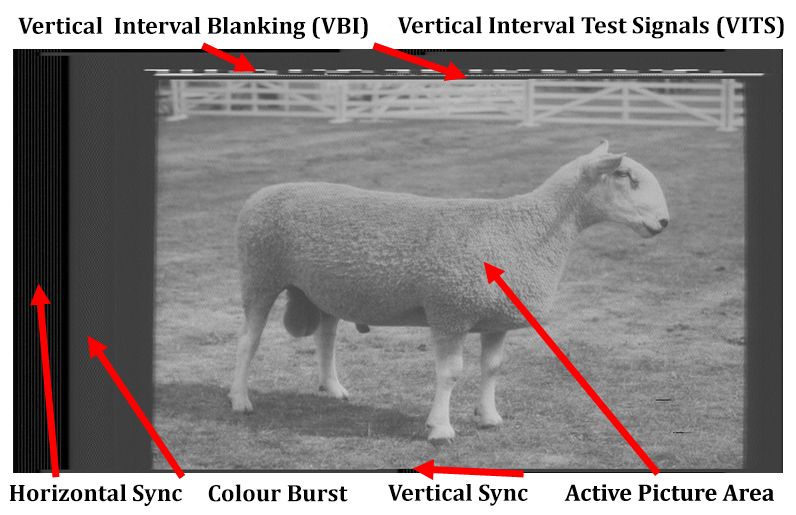
VHS Decode relies on the RF and FM frequencies that are the "source signal" directly from the tracked FM envelope. This is "pre-amplified" signal - bypassing the amplification system inside the VCR. That signal is digital sampled by an analog to digital converter, very similar to traditional devices. They say it samples at 20 - 40 mega samples per second. The raw signal is then sorted (demodulated) into separate channels. We have 4fsc which is the lossless decoded baseband signal, which has the luminance on the FM carrier and the separate chroma (color) information. Then comes the creation of a proper frame, where we just have active picture and then time base correction software and the chroma decoder process are applied. That is outputted to a "normal" file which can be played.
Here's the theoretical pitch: by bypassing the amplification system, we are avoiding the natural "compression" of legacy hardware amplification and taking direct raw signals. A lossless archival file where all information is preserved - nice! We also avoid the costly legacy hardware like time base correctors needed to stabilize signals. The lack of a processing amplifier means there is more room to capture all the brightness and darkness of the image, then perform restoration later. The proposed quality improvements are flashy, as VHS decode examples often look crisper.
I'll start with what I like!
The captures do look great. I'm totally enchanted by the improvements in quality. I've seen similar improvements coming out of the dub cable on the Umatic decks, which is simply because composite signals are notoriously noisy because all signals are wrapped up together on a single video cable. It's worth investigating if we can get parallel results from different modes of cable / signals.
I also love the idea of a complete capture beyond broadcast levels. This includes all the Oversampling is cool and important. I don't see why analog to digital converters cannot raise their data transfer rates / digital sampling rates to over sample more than the broadcast standards allow. Our computers are good enough and cheap enough to handle this.
I really like how great the software is at identifying dropout via dips in the RF signal. I.e. when RF signal grows weaker suddenly it is because the heads are dropping information either because of head clog or damage to the tape. Having a permanent record of RF strength of an entire capture is super valuable information! It might help us determine if we are needing to recapture / bake / clean the head.
 |
A display of the RF signal where you can clearly see if there is a sudden dip in signal strength.
|
Okay so what do I actually think... 1. I only know so much. 2. I do try really hard to understand these concepts 3. And I struggle and agonize, how we will make this a project that is approachable for more people?
1. I feel like the entire hardware setup is just building the VCR... outside the VCR. You still are building an amplifier, maybe a better one? Maybe just the same but with 2025 chips. The persistent cross-hatching issue suggests some issues, as it suggests some electrical impedance issues. Do we need this reinvention of the amplifier?
 |
| Cross hatching |
 |
Cross hatching visible in captures
|
2. I feel like the gains in de-noise are just that - de-noising software. First of all, the "conventional" example is an
unknown VCR - could be good could be bad! There appears to be a softer capture, typical of a standard consumer version. The VHS decode version looks more like a capture using a pro deck like our Panasonic AG-7750.That would be a good endorsement to the software, that it can achieve fidelity similar to Pro VHS decks.
The proposed side by sides of denoising seem to be just to be a software tool applied after capture, one that can be useful but also can be overzealous. When I did software based denoising for audio files transferred from vinyl, I found that the automatic denoising often wiped out all the nuanced information at the top of the frequency, which was really actually the music. I would need to look at the waveforms up close. Could we just get denoising benefits in software after capture?
3. All the side by sides I see comparing capture seem to just be crushed / clipped levels. This is an obvious example
- the processing amplifier black level is egregiously low and with a proper calibration with a Proc Amp would easily be fixed. I would need to see the comparison with info about the TBC used and the levels set.
4. As far as I can see, the dropout compensation software is just entire frame/field replacement. The software sees some dropout and if is severe enough, it replaces the field with the previous one. This is how MiniDV and many digital video works. What if 10 of the previous frames have a skew error? By pulling too far back in time you can create an artifact! I.E. your frame moves while the upper quarter stays stuck, looking like a glitch.
It doesn't replace the fundamental part of time base correction, which is time! The pulses that run under the video signal are on a clock, pulsing at specific intervals to start and end each video line, start and end each field. The time base corrector corrects the pulses, synching them together, not the image itself.
Now... if we are capturing these pulses, then maybe we could actually use them to correct the pulses themselves in a modern software, thereby bypassing hardware. But as it exists, this is a hardware problem not a software problem.
5. As stated, it does take 10 hours to decode a video and the file size is excessive. That alone is enough reason for me to wait until further developments are made to improve this process.
At the end of the day, I feel like there are enough VHS VCRs to supply the world with adequate playback. I think we can get better at repairing hardware timebase correctors to extend their life. I would love to have a system where we output the RF signal into vrecord and use it for capture analysis, or perhaps even simultaneous capture to merge with composite or component captures. There's a lot of really exciting tools and documentation here that is I can see uses for.
10:00 - 10:30 Making WAVs by Asserting Actions: FADGI AV Expores C2PA
C2PA has a tool called Content Credentials, which is a provenance tracking tool, helping to document changes to a file, including edits and source. This group is particularly interested in its ability to label content originating from or edited by large language models. Documentation is essential for the purpose of establishing originality and for understanding how content generated by LLMs differs from any other source.
11:00 - 12:00 It's All on Tape: Case Studies in LTO Technology
LTO is predominant form of storage in archives, especially those with moving image collections. I've talked about it in
other blogs before. LTO stands for Linear Tape Open, in which digital data is encoded onto magnetic tape, that is then read by a magnetic media heads, much like analog videotape.
This panel was one of my absolute favorites, I always learn so much from Linda Tadic of Digital Bedrock, but was so delighted by the really insightful, thoughtful, and well-explained workflows from Video Data Bank and the
GBH Archives. Pedagogically, I thought this was one of the better panels, where many people who have never worked with LTO told me they walked away with a totally clear understanding. This is in contrast to a lot of panels that can feel a lot like acronym shop talk for people already in the know.
Between 2010 and 2016 The Video Data bank went through an in-house mass digitization project of 6,000 tapes representing a broad range of video art history. These digitization files were written to LTO-6 backups and mirrored internal hard drives, one of which was local and the other sent to off-site storage. Pre-2020, the Hard drive set A was connected to a Mac G4 computer with a ATTO Express SAS PCIe Host Bus Adapter, then connected to A Quantum LTO 6 Drive attached via SAS cable. This allowed VDB to read from the hard drive and write to LTO.
The 2012 Mac tower is a SUPER powerful computer with really easy install process, so you can modify them super easily. (In fact TAPE just grabbed 5 of these from the trash). This is the workhorse of the Film & Television Archive digitization workflow, so it is a really powerful computer despite its age. VDB installed this
PCIe card, which allows for faster processing speeds to read and write from SAS and SATA drives.
One of the most exciting tools I learned about was a fit-it script that can index file folders and automatically sort files based on size to make the best use of space on LTO. There is also a
great library of micro services in the AMIA open source GitHub for writing and reading LTO. One cool feature is that in the LTFS format, you can write small files to live in the index portion of the tape, which allows you to access small files (such as header information, description of files on the tape, or maybe even small access copies??) so they can be read and pulled quickly without reading the entire tape.
In 2024, the workflow still uses LTO-6 because there isn't any money provided to staff for such an upgrade. However, VDB did get a new computer, which presented a number of issues. The 2022 Mac Studio has a few compatibility issues with LTO 6 including:
- The Mac Studio has a tiny physical footprint that has no chassis space for mounting a PCIe board - an external chassis is needed to mount the PCIe board
- The new Mac Studio needs to have the LTFS (encoding system) installed
- The fit script that VBD uses needed to be updated for the new computer
Their solution was to have an external chassis to hold the card. Unfortunately, LTFS had some install compatibility issues on the new Mac which was solved with MacFuse.
GBH Archives, which is the Boston public radio station, has a unique situation in which they work for both production and archiving needs for an active radio station. The IT department invested in cloud storage for digital objects, which was free and usable for production, but later became unusable. In 2020, the Archive got a digitization grant to migrate material to LTO8, which included the transformation of 1624 tapes (basically 812 tape with unique material) consisting of 2 Pedabytes of data into 174 LTO8 tapes. This is because LTO8 supports 10TB of storage on each tape, as opposed to LTO6 which supports 2.5TB.
They used a combination of the following software: HP StandAlone StoreOpen which is a software specifically made for LTFS HP technology for LTO, Filemaker for cataloging use, and a custom script written to write to AWS (Amazon Web Services) for cloud backups. And the computer was a Dell precision computer.
During the pandemic, the team had to quickly pivot to work from home with temporary allowances to go into the office to change the tape in the deck. They invested in an auto loader that would allow them to load several tapes at a time, but this presented a lot of compatibility issues where the deck would constantly forget a tape was mounted. Despite the challenges they developed a workflow that allowed them to constantly run tapes for this process.
At the same time, the cloud services that the IT department invested in failed pretty dramatically. The rate of data loss was very high and most pull down requests would fail at 72% completion which not only presented an issue for speed but data fidelity. In other words cloud storage was so inconsistent and failures were so high that it basically forced the IT department to rely exclusively on the LTO backups created by the archive team.
This is a common thread for cloud storage, as it is terrible at handling large files (like preservation files made for moving image archiving). The "sharding" of data used in AWS (Amazon Web Services) means that individual files are broken up and stored in multiple locations, which requires high computation power and a really consistent access to each location to be able to accurately reproduce the file. The GBH case shows how easily that breaks down.
Lastly, Linda Tadic from Digital Bedrock presented on recommended workflows and the future of LTO. Digital Bedrock is an incredible organization and I always really enjoy their presentations. The organization is based out of the Direct Connect Facility in Downtown LA which is the main hub for companies sending information to and from offsite cloud storage for the region. They are located underground, in a cooled facility, with access to the technology and routing signals for sending information to separate geographic locations. They do two types of services : full and lite backups which are essentially just LTO independent (not copies) redundancies stored in secret locations. Everything is open source, nothing is proprietary. Each copy is written with a SHA-512 checksum AKA a 64-bit uniquely generated fingerprint which can cryptographically verify the integrity or sameness of a file.
She gave some great recommendations for the maintenance of decks and fiber optic cables needed for long term preservation. Something new I learned was the need to clean fiber optic cables, as they can accumulate dirt and slow down read / write speeds, or even cause data errors. There is a cute tool called a fiber optic pen that does just that!
After the tapes are written they "go to sleep" in cold storage, forming a network of non-energy intensive cold backups for critically important information. This is in stark contrast to the hot AWS or other cloud storage services which are sucking the earth dry of water and power, and contributing to massive climate footprints.
Digital Bedrock holds 63 million files, 315 pedabyes, with 5 tape robots, 31 desktop drives.
Last year, Linda Tadic spoke about the significant issues with LTO 9 and their refusal to write tapes to this generation. Very basically, her testing showed that tapes written in conditions that were different than where they were read had significant data integrity issues as a result of fluctuations in the tape itself. Humidity and heat caused the tape to warp, meaning it couldn't consistently be read.
Excitingly, she shared that LTO-10 decks will have Dynamic !! heads which means they will be forgiving and able to move with fluctuations in the tape. This is huge and good news. Basically, damaged tapes will play better than ever, making this a super desirable deck for long term playback.
Each tape will hold 36 Terabytes of data. It will made of a combination of Barium Ferrite and Strontium Ferrite. The projected write time for the tape is about 10 hours. In the future, new generations of LTO 10 will be made with an arrimid base, which is incredibly strong although expensive.
One interesting quirk is in the codes that are needed to read and write each tape. LTO 10 has too many charters, (compared to LTO 9) so the labels will change in the future.
An additional little quirk I learned is that the half robots are less forgiving than the full ones. I'm not sure why - but the full rack will become available at the end of the decade while the half height is coming in 2027.
The projected roadmap of LTO going up to 576 TB, but basically Linda suggested anything about 70 - for Gen 11 - will take too long to write. She is transitioning after that to DNA storage because that's where research and development is focused.
3:15 - 4:15 Reel to Reel: Archiving the Monday / Wednesday / Friday Video Club
I was really excited to hear from the
XFR Collective, a volunteer run organization in New York that preserves and digitizes videotape for the arts community in New York.
Since then, XFR Collective, an offshoot of the project, was housed in a number of creative locations! The connection is super clear to me - in order to preserve these decentralized, ad hoc, and anti-institutional histories, a parallel preservation arm naturally emerges to address these gaps. XFR embodies this perfectly, a dedicated group of volunteers serving almost as a "community vendor" - committed for the love of the work, banded together across ad hoc locations and a desire for greater access to preservation tools
The collective started with a collaboration with the Metropolitan Library Council, where they had a beautiful space to house the transfer rack and the collective could also train library staff and the public on digitization. This is a fantastic model for access to sustainable space for orgs like TAPE or XFR Collective, as library budgets can support preservation work.
During the Pandemic, the group transitioned to "home" racks, distributed to volunteers across the city. There were a lot of lessons learned on how to best track equipment, but I love the vision of a network of beautiful little racks all over the city.
Now, the main digitization rack is housed inside
P.I.T. (Property is Theft), an anarchist space in Williamsburg. They take up the back corner (like TAPE inside Whammy!)
I loved hearing about their "Digitize yourself to Death" events, where they host pop up digitization stations for the public to use. They have held them at
Secret Project Robot, Spectacle, etc. I didn't realize it was this event, but I was deeply inspired by a photo I saw from the XFR Collective of a digitization rack they built to be more portable. In traditional archiving, portability is never even introduced as an idea, which is a frankly lame and narrow approach to this rare and expensive equipment.My dream to do a portable rack came true this August with a digitization workshop at LAPL... it made me so emotional!
XFR Collective also works closely with other orgs to run home movie day with orgs like the Queens Library. It's really clear from their work that even organizations that you assume have a lot of cultural power still rely on dedicated audio visual archivists to intervene to preserve their work - the collective has worked with a number of museums, libraries, and archives to preserve their AV work.
One of the most affirming threads in the conversation was about the importance of celebration - "we don't take the celebration lightly" to quote directly. Celebration of preservation and volunteer work is so important, as it ties together the community towards this shared goal, which can be simlutanously joyful and frustrating. I also loved to hear that the collective has worked with Spectacle to organize screenings of their work. It's a clear reminder to me that joy and celebration are essential building blocks to sustainability and resilience.
It's inspiring to see how XFR Collective is committed to an ethos of education through practice. There was a lot of joy and commitment emanating from the group of presenters, and it's fantastic to see that in action.
Read more about XFR Collective:
4:30 - 5:30 Signed, Sealed, Delivered? Workflows for New and Existing Donor Agreements
I was delighted to listen in on a presentation from my colleagues at the UCLA Film & Television Archive about donor agreements and copyright at the Archive. It was truly emotional to hear about all the incredible progress my friend Adrianne has made in assessing donor agreements, all to the aim of making the archive more accessible, supportive of filmmakers, and resistant for the future.
Director of the Archive May and TV Curator Mark gave a fanatastic history of the archive and outlined the needs for the project. The UCLA Film & Television Archive started as the "last stop before the landfill" - UCLA or "ocean vaults" as was the early years were described. It was the first film archive in Los Angeles, started in 1965, long before studios had a clear sense of value for the preservation of their works, let alone a home for independent cinema. While this ad hoc trash collection let to some genuinely incredible preservation work of films that would otherwise be lost, it has also created contemporary problems around rights.
Curators, surrounded by a mountain of unclear and spotty donor agreements, most of which were never designed for internet access, were left feeling unmoored by the future of access. It was the unknown, the uncertainty of what to do next that would be the best use of staff time, that became the problem, not the copyright law itself. Curators long had relationships of building trust and demonstrating care for filmmakers and studios, so those individual interactions often resulted in some fantastic preservation work. Reaching out to all filmmakers one-by-one for a collection of 350,000 motion pictures, 170,000 television programs and 27 million feet of newsreels, however, was simply unattainable for a small staff.
That's where Adrianne was hired! Adrianne's thesis at NYU MIAP
"Assessing Rights Management Risks in Moving Image Collections" sums up her work well. Rather than legal interpretation of copyright, Adrianne's work seeks to sort, describe, and assess types of agreements for better use of legal counsel time and the ability to make blanket assessments.
The first part of her project is a mass digitization of critical documents inside each donor agreement, starting with an assessment of what to scan and not. Many of these documents also involved not just agreements but attempts to contact, critical for the "due diligence" part of copyright law.
From there, Adrianne has built an Airtable spreadsheet that tracks critical information about the 3000 individual agreements, links data together, and tags each agreement with different legal metadata. This is the most exciting part to me! By tagging each agreement with standard data, patterns start to emerge that help curators make bigger assessments.
Copyright law and donor agreements are the actual heart of any archive. They demonstrate care care for the work, trust from artists, and documentation of rights.
This blog is written by Jackie Forsyte, T.A.P.E.'s Technical Director.
T.A.P.E. is a 501(c) 3 non-profit dedicated to access to analog media making, preservation, and exhibition. To support our work and access great benefits, join our patreon at $5/month. You'll get access to exclusive rates for our rental equipment library, access to our digital and physical videotape library, and other member benefits.


